
AudienceMx - Article
Workflow: Integrating AI Post Tools into a Weekly Marketing Routine
Learn a repeatable weekly workflow that plugs an AI powered LinkedIn content creation tool into planning, drafting, editing, and scheduling so small.

Consistent posting on professional networks is one of the fastest ways for busy professionals and small teams to build visibility and trust. The challenge is that high quality content takes time, and hiring more headcount is often not an option. This workflow shows a repeatable weekly process that plugs an AI post tool into planning, drafting, editing, and scheduling so small teams can publish consistently without extra headcount. The goal is predictable output, preserved brand voice, and measurable improvement over time.
Throughout this guide I will use practical examples for content strategists, marketing directors, solo founders, and social media managers who rely on a LinkedIn content creation tool to generate ideas, draft posts, improve tone, and automate a content calendar. You will get a day-by-day breakdown, recommended prompts, guardrails for quality, and a simple metrics loop you can adopt in under two hours per week. Follow this to reduce friction, scale your presence, and spend more time engaging with your audience rather than wrestling with logistics.
Why a weekly workflow matters for busy professionals
A weekly rhythm breaks the content process into focused chunks that reduce context switching. When a team uses a LinkedIn content creation tool as a central hub, ideation, drafting, editing, and scheduling become repeatable tasks rather than ad hoc fires. Repeatable tasks enable batching, reuse of templates, and gradual improvement through iteration. For small teams, that means more output with the same bandwidth. Learn more in our post on Weekly Content Planner Template for Busy Professionals.
In addition to efficiency, a weekly workflow helps preserve consistency in voice and messaging. The best AI tools are designed to learn a voice profile and apply it across posts. That makes it possible for an individual or a two person team to consistently adopt a professional tone, maintain signature hooks, and follow an editorial plan without manual rewriting every time.
Finally, a weekly process supports strategic choices. Instead of reacting to trends every day, teams can plan a content mix that balances thought leadership, practical tips, case studies, and community engagement. A LinkedIn content creation tool can accelerate this by generating multiple variations of the same idea, suggesting hooks, and providing tone improvements so the final output is polished and aligned with brand goals.
Week at a glance: roles, time budgets, and expected output
Define minimal roles to keep the process lean. For a small team, you can move from concept to published post with just two people: an editor/approver and a content owner who curates ideas and engages. A LinkedIn content creation tool takes on much of the heavy lifting, allowing those two roles to focus on high value tasks. Learn more in our post on Create 30 Days of High-Quality LinkedIn Post Ideas in 60 Minutes Using an AI Tool.
Here is a time budget you can use as a template. These estimates assume you are batching work and using AI to accelerate drafting and editing.
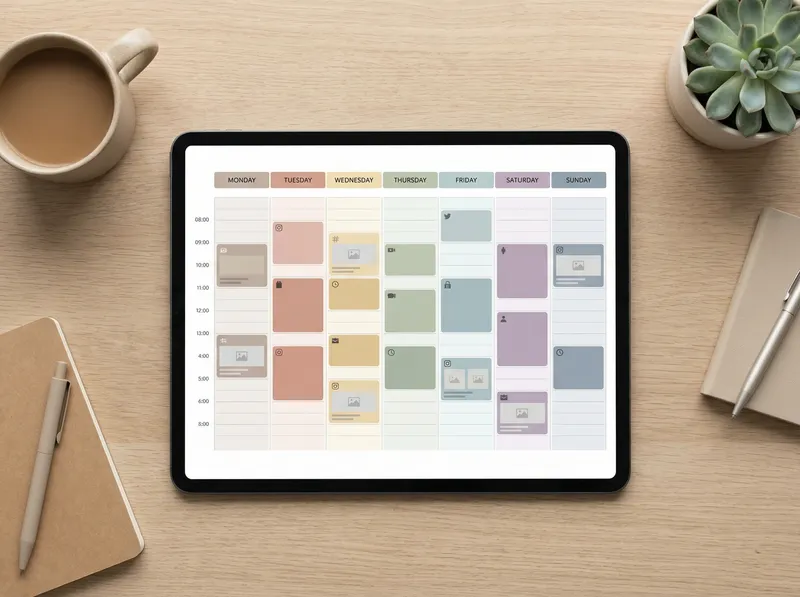
Planning and ideation: 45 to 60 minutes on Monday. Generate 6 to 10 ideas for the week and prioritize them.
Drafting: 60 to 90 minutes on Tuesday. Use the AI tool to generate drafts and variations for each idea.
Editing and approvals: 30 to 45 minutes on Wednesday. Apply tone improvements, add personal anecdotes, and sign off.
Scheduling: 15 to 30 minutes on Thursday. Use the tool to populate the content calendar and schedule posts.
Engagement and review: 30 to 60 minutes on Friday. Respond to comments, track early signals, and capture insights for next week.
This weekly rhythm aims for 3 to 5 high quality posts per week depending on your appetite. A LinkedIn content creation tool that offers unlimited drafts and editing makes this output predictable without multiplying headcount.

Day by day process
Below is a practical, reproducible routine with prompts, examples, and governance checkpoints you can implement immediately. Learn more in our post on Long-Term Content Strategies That Survive Algorithm Changes.
Monday: Strategy and ideation
Start each week by aligning to the business priority. Ask: what topic supports our goals this week? Is the focus lead generation, credibility building, hiring, or product announcements? A clear objective narrows the ideation scope and improves relevance.
Use your LinkedIn content creation tool to generate a list of ideas. Feed it context like target audience, company priorities, and recent wins. Ask for a variety of angles: lessons learned, controversial takes, short how tos, and personal stories. The tool can produce 10 to 15 seeds in minutes. Curate them down to 6 to 10 ideas worth drafting.
Actionable prompt example
Provide the tool with a concise brief: audience profile, goal, and 2-3 keywords.
Request 3 variations per idea: short tip, long story, and question-based engagement post.
Tag each idea with priority and owner to keep accountability clear.
Governance tip: keep a content repository where you store approved idea briefs and evergreen assets for reuse. If your LinkedIn content creation tool supports PDF uploads or notes, attach the longer form sources to each idea so the tool can reference them during drafting.
Tuesday: Drafting and rapid iteration
Batch drafting saves cognitive energy. Open your top 6 ideas and ask the LinkedIn content creation tool to produce first drafts. For each idea, request 2 to 3 tone variations and one long-form expansion that could become a newsletter or article. This gives flexibility when scheduling and repurposing.
When you draft, use the tool to create strong hooks. A great hook decides whether people stop scrolling. Ask for five hook options per post and pick the one that fits your voice. Because the tool can generate many alternatives quickly, you can A B test hooks within your drafts before publishing.
Practical prompt examples
Draft a 120 to 250 word post that starts with a question and ends with a clear call to action.
Give five hook options focused on curiosity, urgency, empathy, results, and controversy.
Generate three headline styles for the same post so you can optimize later when scheduling.
Batching also allows you to create media notes. If you plan to include an image, brief the composition in the post notes so the visual assets are ready when you schedule.
Wednesday: Edit, align, and personalize
Editing is where quality and brand voice are enforced. Use your LinkedIn content creation tool's one click tone improvement and precision writing features to refine clarity, remove filler, and tighten hooks. Then add personalization. Personal anecdotes, short data points, or client examples increase credibility and engage readers.
Approvals should be fast. Create an editing checklist your team follows each week. A typical checklist includes: clear hook, single main idea, 3 to 5 practical takeaways, proper tags, and a final call to action. The editor gives sign off or requests one round of revisions. Because AI editing reduces the number of drafts, the approval loop is efficient.
Governance tip: maintain a voice guide inside the tool. Document phrases to avoid and the preferred level of formality. This reduces manual rewrites and helps junior team members maintain consistent voice.
Thursday: Scheduling and multi-format planning
On Thursday use your content calendar to schedule posts for optimal times. Many professionals get the best reach early in the week and mid-morning. Test times and adjust based on your audience. Your LinkedIn content creation tool should allow you to queue posts and set custom publishing times for each market you target.
Also plan repurposing. Turn one long post into three micro-posts, create a short article from a story, and prepare a follow up question to post later in the week. Automation helps here. If your tool supports content calendar automation and unlimited drafts management, you can create a single source post and then generate the derivative pieces automatically.
Practical scheduling tips
Schedule initial posts plus two follow up micro-posts across the week to maximize reach.
Add reminders for the content owner to engage in the first two hours after publishing.
Tag posts by campaign so performance can be aggregated later.
Friday: Engagement, review, and iteration
Friday is for measurement, engagement, and planning. Spend time replying to comments and connecting with new responders. Early engagement signals can shift a post's reach, and personal replies show commitment. Capture recurring questions from the audience and add them to next week’s ideation list.
Review metrics for the week. Which hooks performed best? Did long posts get more conversations than short posts? Use these signals to refine the priority list for the next Monday. The goal is a consistent learning loop that improves relevance and saves time.
Actionable review checklist
Note top performing posts and extract common elements.
Log two ideas generated from audience questions.
Adjust the content mix for next week based on engagement rates and business priorities.
How to integrate AI post tools at each stage
An AI post tool is most useful when it acts as an assistant that reduces low level work and leaves humans to add judgment, context, and relationships. Below are ways to integrate such a tool across the four stages of a weekly workflow.
Ideation: Use the tool to surface topic clusters and trending angles. Ask it to generate content series themes you can run for four weeks. The tool can suggest pillar topics that build on each other so your audience receives a coherent narrative over a month.
Drafting: Convert an outline into multiple drafts and generate alternative hooks. An effective LinkedIn content creation tool will also provide a "clarity" mode that shortens complex sentences to increase scannability. For professionals who lack time, ask the tool to create a version optimized for mobile reading and another for desktop readers.
Editing: Use the tool to align for tone, reduce filler, and format for readability. Look for features such as enhanced hook creation, precision writing interface, and one click tone improvement. These features reduce manual editing and help junior writers produce senior quality posts.
Scheduling and automation: Use the calendar automation feature to queue multiple posts and repurpose content automatically. If the tool supports uploading PDFs and notes, attach your longer assets so the AI can produce post variations without retyping source material.
Templates, prompts, and governance
Having repeatable prompts and templates reduces cognitive overhead. Below are templates that teams can reuse. Store them in your LinkedIn content creation tool so every team member uses the same starting point.
Template 1: The 5 line story
Line 1: Hook. Start with a measurable result or emotion.
Line 2: Early context. Two to three brief facts.
Line 3: The challenge. One sentence about the obstacle.
Line 4: The action. What you or the team did.
Line 5: The lesson and CTA.
Template 2: The how to post
One sentence describing the problem.
Three actionable steps with bolded results when possible.
One line encouraging the reader to try and report back.
Prompt bank for the AI tool
Generate five hooks for this topic aimed at CXOs in marketing.
Rewrite this draft to sound like a confident but friendly founder voice.
Shorten this post to a version under 140 characters for quick updates.
Expand this idea into a 500 word article outline with headings.
Governance checklist
Maintain a voice guide in the tool and update quarterly.
Require one human approval for posts that mention clients or results.
Archive rejected drafts with notes to avoid repeat mistakes.
Limit characters for headlines and ensure CTAs are clear.
Measuring success and iterating without added headcount
Measurement does not need to be complex. Focus on a few metrics that indicate attention and business value. For professionals using a LinkedIn content creation tool, the metrics to track weekly include reach, comments, saves, and conversion actions such as profile visits or direct messages. Track these against content type and hook to learn what resonates.
Create a simple dashboard or sheet that logs each post with tags for topic, format, and CTA. At the end of the week review the top three and bottom three posts. Extract patterns and adjust the content brief for next week. The time investment is low and yields compounding benefits because the AI tool helps you scale insights by generating more variants and testing them quickly.
Examples of quick experiments
Test short versus long posts on the same topic and compare engagement rates.
Run A B tests on hooks by publishing similar posts at different times.
Try a series format for one theme across a week and measure cumulative engagement.
When a tool offers automated content planning and unlimited drafts management, teams can run multiple small experiments without additional headcount. The results feed directly into the ideation stage so the next week starts with data driven hypotheses.
Common objections and how to overcome them
Objection 1: AI will make posts sound generic. Response: Use the personalization features. Add short personal anecdotes and data points during editing. Keep a voice guide inside the LinkedIn content creation tool and use it to produce on-brand drafts.
Objection 2: The tool cannot understand my niche. Response: Upload niche documents and client notes so the tool has context. Use RAG backed content generation when available to ground outputs in your source material and avoid hallucination.
Objection 3: Scheduling feels automated and robotic. Response: Build a cadence that includes human moments. Schedule posts but block time for the content owner to engage in the first two hours. The combined approach keeps distribution efficient and engagement authentic.
Objection 4: I do not have time to maintain the process. Response: The weekly time budget above is intentionally small. Most teams reach steady state in four weeks and then maintain momentum with 60 to 90 minutes per week. The initial setup takes slightly longer but pays back quickly through batching and reuse.
Practical examples and playbooks for common content goals
Goal: Establish thought leadership
Playbook: Run a four week series on a single pillar topic. Each week publish a long thought post, two micro-posts that highlight lessons, and one engagement post that invites conversation. Use your LinkedIn content creation tool to produce outlines and suggest empirical anecdotes to support your claims.
Goal: Generate leads
Playbook: Publish problem statement posts paired with a soft CTA that invites direct messages or a resource download. Use the tool to craft conversion friendly CTAs and alternative phrasings to reduce friction. Schedule follow ups that remind readers about the resource and include social proof.
Goal: Recruitment and employer brand
Playbook: Share employee stories and team milestones. The tool can help create interview style posts and extract quotes from longer conversations. Keep posts authentic by adding direct quotes and a short note from the hiring manager.
How AudienceMx features plug into this workflow
AudienceMx is designed as an AI powered LinkedIn content creation tool that supports every stage of this weekly workflow. Its features map directly to the steps above. For ideation, the Content Ideas Generator produces batch ideas and series suggestions. During drafting, the Personalized Post Generation and Unlimited AI Writing let teams create multiple drafts and hook options quickly.
For editing, AudienceMx offers one click tone improvement and precision writing interfaces that reduce manual proofreading time. The RAG backed content generation and PDF upload features allow teams to ground posts in source material, improving accuracy and trustworthiness.
Finally, the Content Calendar Automation and Unlimited Drafts Management streamline scheduling and repurposing. That means small teams can maintain a steady content output, iterate faster, and keep the editorial chain short. If you want to test this workflow, start with a free trial to see how many drafts and edits you can produce in an hour.
CTA: If your goal is to publish consistently without increasing headcount, try AudienceMx for a month. Use the templates and voice guide described in this article, and you will likely reduce weekly content time while maintaining or improving engagement. The tool was built to help professionals scale personal branding with minimal friction.
Scaling beyond the first month
After you stabilize the routine, focus on two types of scale. The first is horizontal scale which increases volume. Use your LinkedIn content creation tool to generate more topic variations and repurpose existing posts into newsletters or article outlines. The second is vertical scale which improves quality. Invest time in stronger storytelling, richer data, and longer form content that deepens your thought leadership.
At month two consider a mini content audit. Review the posts that drove the most profile visits, conversations, and business outcomes. Map those to topics and hooks and convert top performers into a pillar piece. This pillar can become a downloadable resource or a published article you reference in future posts. The AI tool can help expand a high performing post into a longer resource while preserving the same tone and structure.
Governance for scale
Create content owners for each category to keep quality high.
Document successful prompt formulations so new team members can reproduce results.
Run monthly editorial reviews that use data to prioritize topics for the next quarter.

Common metrics and what they reveal
Choose a small set of metrics and be consistent. For most professionals using a LinkedIn content creation tool, these four metrics matter most.
Impressions and reach show visibility and headline effectiveness.
Comments indicate conversation and relevance.
Saves highlight perceived value.
Profile visits and messages are leading indicators of conversion intent.
Monitor these metrics weekly and synthesize findings at the end of each month. Use the data to refine hooks, formats, and publishing times. When experiments succeed, lock in the winning templates and incorporate them into the prompt bank in your LinkedIn content creation tool.
Final thoughts and next steps
Publishing consistently does not require a bigger team. It requires a reliable rhythm, a few governance rules, and a tool that reduces low value work. By batching ideation, drafting, editing, and scheduling into a weekly routine you can create a predictable output that improves over time. A LinkedIn content creation tool acts as a force multiplier. It helps you generate ideas, craft variations, tighten tone, and automate scheduling so two people can do the work of a larger team.
Start with a single week pilot. Allocate the time pockets described earlier and use the templates and prompt examples in this guide. Track the results, and refine your prompts based on what performed best. Within four weeks you will have a reliable flow and a library of content you can repurpose.
If you are ready to scale your personal brand and reduce the manual workload of content creation try AudienceMx. Use the Content Ideas Generator to fill Monday, Personalized Post Generation for drafting on Tuesday, one click tone improvement for Wednesday edits, and Content Calendar Automation for Thursday scheduling. Finish the week by engaging and reviewing performance on Friday. The combination of process and AI will create compounding returns over time.
Publishing consistently on professional networks is achievable without increasing headcount. The right workflow and a purpose built tool can turn one hour of focused work into a week of high quality content. Implement this weekly process and give your audience predictable, valuable posts that build trust and open doors.